What legal knowledge management software actually is
Legal knowledge management software makes a firm’s own work product findable and reusable. Not the public case law — the firm’s own briefs, contracts, memos, settlement positions, playbooks, and the reasoning behind them.
The distinction matters because most of the tools a firm already owns solve a neighboring problem. A document management system stores files reliably. A legal research database covers statutes and published opinions. A general-purpose chatbot answers from whatever it was trained on. None of them can answer “what did we argue the last time an insurer took this position, and how did it land?”
That question is the whole category. Knowledge management software exists so the answer lives in a system rather than in whoever happens to remember.
Why the requirements changed in 2026
Firms have run knowledge programs for decades — precedent banks, clause libraries, taxonomies maintained by a knowledge lawyer. What changed is that generative AI made the retrieval side cheap, and made the quality of the underlying knowledge base the thing that decides whether the output is usable.
An AI assistant with no access to your files gives you a competent answer about how firms in general handle something. An assistant grounded in your files gives you the answer your firm has already committed to in front of a client. The second one is worth paying for. The first one is a search engine with better manners.
This is also why the buying question shifted. It used to be “can we store and tag our precedent?” It is now “can a lawyer ask a question in plain English and get an answer they can check against the source page before it goes into a memo?”
The four capabilities that actually matter
1. Search that understands meaning, not filenames
Nobody remembers what the file was called. Semantic search returns the document that answers the question even when the words in the question never appear in the document. Keyword search still matters for the times you do know the exact clause name, so the useful systems run both and let you filter by matter, practice area, client, or date.
2. Answers cited back to the source page
An uncited answer creates work rather than saving it, because the lawyer has to go and verify it from scratch anyway. Under ABA Formal Opinion 512, the duty to verify stays with the lawyer regardless of what the tool produced. A system that links every assertion to the page it came from turns verification into a two-second check. A system that does not turns it into a research project.
3. Scoping a question to a specific set of documents
“What does our standard change-of-control language look like” is a different question from “what does the change-of-control language look like across these forty agreements with this one counterparty.” The second question needs the ability to define a working set, ask against only that set, and save it for the next time the same question comes up.
4. Isolation of your firm’s data
Ask directly: is our content indexed separately from every other customer’s, and is anything in our files used to improve a model that other customers touch? For firms handling medical records, the same question extends to how protected health information is stored and processed. Our own approach is documented on the security page; whatever vendor you evaluate, get the answer in writing rather than in a sales call.
How the categories differ
Buyers routinely compare tools that are not in the same category. This is roughly how the four groups divide:
- Document management systems store and version files, control access, and integrate with email. They answer “where is the file.” They do not answer “what did we decide.”
- Legal research databases cover statutes, published opinions, and secondary sources. They are authoritative on public law and silent on your firm’s own work.
- General-purpose AI assistants are fast and cheap and know nothing about your matters. Useful for drafting scaffolding; not a source of firm knowledge.
- Knowledge management software indexes your firm’s own material and answers questions against it, with citations back to the source.
Most firms end up running more than one of these. The mistake is assuming that owning the first two means the fourth is already covered.
Eight questions to ask a vendor
- Does every answer link back to a specific page in a specific document, or only to a document?
- What happens with scanned records and handwritten notes — are they read, or skipped?
- Can we scope a question to a defined set of documents and save that set?
- Is our index separate from other customers’, and is our content ever used to train a shared model?
- Does the system respect our existing matter and ethical-wall permissions, or does it create a second, flatter permission model?
- What does onboarding actually involve — who tags the back catalogue, and how long does it take?
- How does the system handle a document that has been superseded, so it does not confidently cite a version we abandoned?
- What does the answer look like when the files genuinely do not contain the answer?
The last one separates the serious tools from the demo-friendly ones. A system that says “this is not in your documents” is safer than one that produces a fluent answer with nothing behind it.
A 30-day way to evaluate
Week 1 — pick the questions first. Write down ten real questions your team asked in the last month and had to chase down by hand. Vendor demos run on the vendor’s content and the vendor’s questions; yours are the only ones that predict anything.
Week 2 — load a real corpus. One practice area, a few hundred real documents, including the messy scanned ones. A pilot on clean, curated files tells you how the tool behaves on a corpus you do not have.
Week 3 — check the citations, not the prose. Take twenty answers and open every source. Count how many point at the page that actually supports the claim. That number is the product.
Week 4 — put it in front of the people who will use it. Paralegals and associates find the failure modes that partners never hit, because they ask the boring, high-volume questions the system has to get right every time.
Where this fits at FasterOutcomes
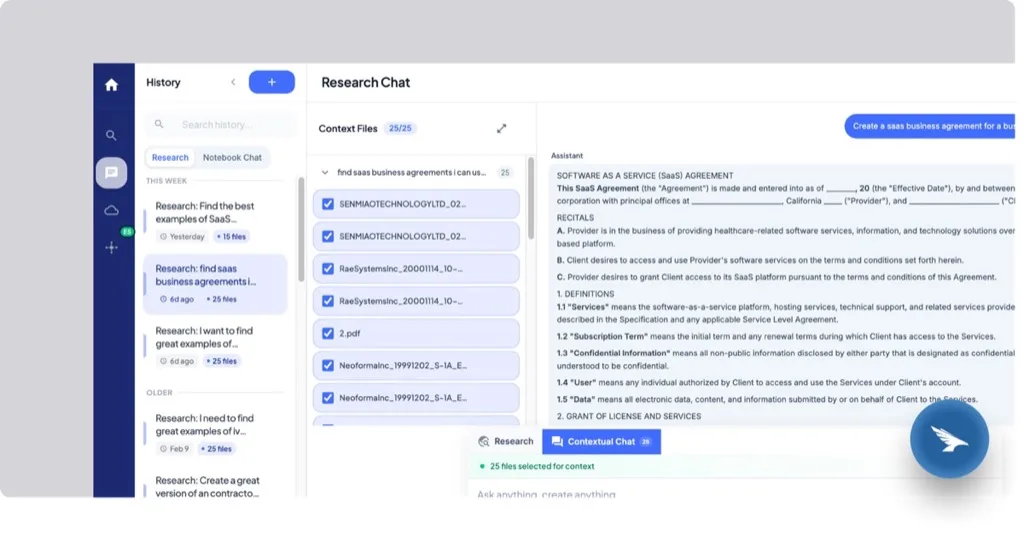
Knowledge is our answer to this category: semantic and keyword search across your firm’s own files, chat that cites back to the exact page, and notebooks that scope a question to a curated document set. It runs alongside the practice-area playbooks that carry how your firm actually works a matter, so what the firm learns on one case becomes available on the next.
If you want to see it on representative material, book a demo and use a de-identified file or one of our samples.
Frequently asked questions
What is legal knowledge management software?
Legal knowledge management software captures, organizes, and retrieves a law firm’s own work product — briefs, precedent, contracts, memos, and the reasoning behind past decisions — so lawyers can find and reuse it instead of starting from a blank page. Modern systems add natural-language search and cited answers on top of that library.
How is knowledge management different from a document management system?
A document management system stores, versions, and secures files; it answers “where is the document.” Knowledge management software answers “what do we know,” retrieving the relevant passage across many documents regardless of where the file lives or what it was named. Most firms run both, with the knowledge layer indexing content the DMS holds.
Does legal knowledge management software replace legal research tools?
No. Legal research databases cover public law — statutes, published opinions, secondary sources. Knowledge management covers the firm’s own material, which no research database contains. The two answer different questions and are usually used together.
Is it safe to use AI on confidential client files?
It depends on the vendor’s architecture, not on AI in general. The questions that matter are whether your content is indexed in isolation from other customers, whether anything in your files is used to train models other customers touch, how the system enforces your existing matter permissions and ethical walls, and whether every answer can be traced to a source you can check. Get those answers in writing.
How long does it take to get value from a knowledge management system?
That depends far more on the state of your back catalogue than on the software. Firms whose work product is already centralized can pilot a single practice area in weeks. Firms whose precedent is scattered across personal drives and inboxes should expect the gathering to take longer than the deployment, and should start with one practice area rather than the whole archive.
Which firms benefit most?
Firms with repeatable work and turnover in the people who do it. That includes personal injury practices running high case volume on similar fact patterns, business and corporate teams reusing negotiated language, and any firm where a departure would take working knowledge with it.
―
Stay Ahead with AI-Driven Legal Innovation Read more insights on the FasterOutcomes Blog.- Connect with us on LinkedIn
- Follow us on Instagram
- Get in touch through our contact page