A medical chronology is the backbone of a personal injury file. It is also the single most expensive document a firm produces by hand: someone has to read every page of a records production, work out what each page is, put the events in order, and write down what happened and when — before anyone can value the case.
AI medical chronology software exists to take that first pass. This guide covers what the category actually is, how it differs from the tools it gets confused with, what separates a usable product from a demo, and how to evaluate one in thirty days.
What AI medical chronology software actually is
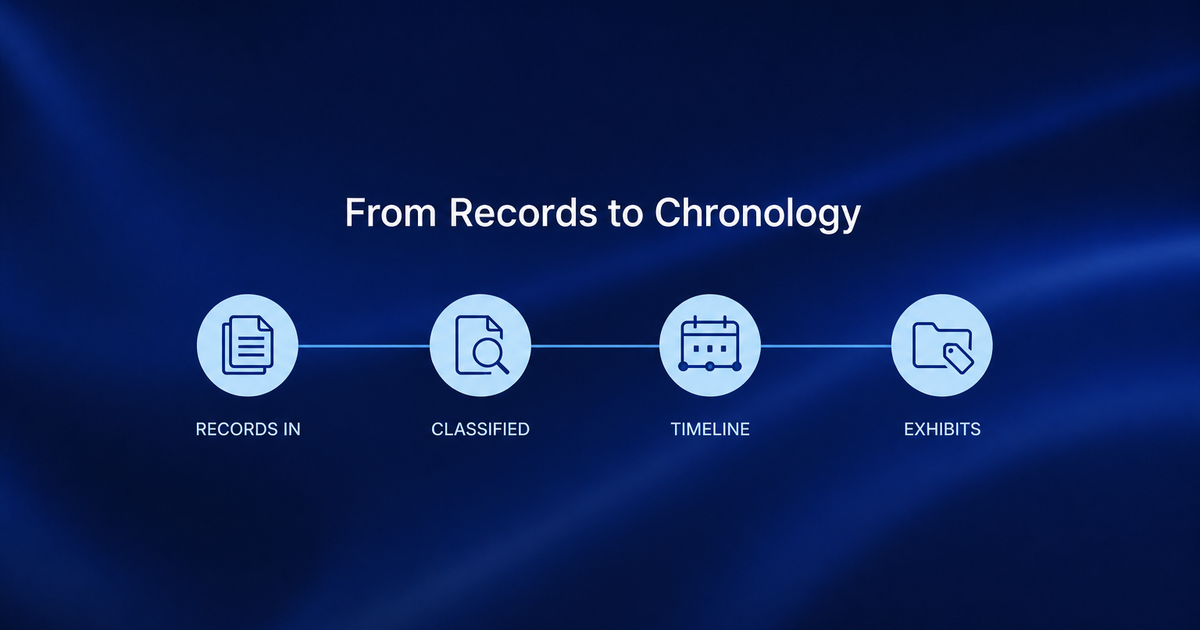
It is software that ingests a raw medical records production — usually a single large PDF, often thousands of pages, frequently a scan of a scan — and returns an ordered, sourced account of the claimant’s treatment: date, provider, encounter type, findings, and the page each of those came from.
The important word is ordered. A records production does not arrive in chronological order. It arrives in whatever order the custodian’s system exported it, with duplicates, with the same visit documented three times by three departments, and with billing ledgers interleaved among clinical notes. Turning that into a timeline is the work. Extracting text is not.
Why the requirements changed
Two things moved at once.
First, the files got bigger. Electronic records can turn a treatment history into thousands of pages, many of them duplicated headers, portal messages, and administrative pages. The volume did not add information; it added reading.
Second, the models got good enough to classify a page rather than merely transcribe it. That is the shift that makes this category possible. A tool that can tell an operative report from a billing summary from a radiology impression can build a timeline. A tool that can only turn pixels into characters cannot — it just hands you the same 2,000 pages as searchable text.
The practical consequence for a buyer: a demo on a clean, 40-page sample proves almost nothing. The hard part of this problem only shows up at volume, on bad scans, in files that were never organized.
The five capabilities that actually matter
1. Every page classified, not just read
Ask what the system does with a page before it writes a chronology entry. A serious product assigns each page a type — clinical note, imaging report, lab result, operative report, billing record, correspondence — because the type determines whether the page belongs in a treatment timeline at all. Without classification, billing ledgers end up in the chronology as if they were visits.
2. A timeline cited to the page
Every entry should carry the document and page number it came from, and you should be able to click through to it. This is not a nicety. A chronology you cannot verify is a chronology you have to re-read, which means you have paid for the work twice. It is also what makes the output safe to build a demand on: opposing counsel gets to test every date you assert.
3. Treatment gaps surfaced while they still matter
A 60-day gap in treatment is worth finding in month three, when the client can still be redirected into care, not in month eleven when the adjuster finds it first. The useful behavior is monitoring — the chronology updates as records arrive and flags the gap — rather than a one-time report generated at the end.
4. Exhibit lists that fall out of the chronology
The chronology and the exhibit list are the same underlying work. If your tool produces a narrative but leaves you to build, tag, and sort exhibits by hand in a separate system, it has automated the writing and left the assembly.
5. Handling the file as it actually arrives
Real productions are one enormous PDF with no bookmarks, mixed orientations, handwritten intake forms, and a fax header on every third page. Ask directly how the system splits that file into documents, and what happens to a page it cannot confidently classify. The honest answer is that some pages need a human; the answer you want is that the system tells you which ones rather than guessing quietly.
How the categories differ
Four kinds of product get sold into this problem and they are not interchangeable.
- Manual review services. A person reads the file and writes the chronology. Accurate, and the cost and turnaround scale linearly with page count — which is exactly the constraint firms are trying to escape.
- OCR and document management. Makes the file searchable and stores it safely. Genuinely necessary, and it does not order events or tell you what a page is. Search finds the word “MRI”; it does not tell you the MRI came after the second course of physical therapy.
- General-purpose AI assistants. Strong at summarizing a document you paste in. Weaker at a 2,000-page production, and typically unable to cite a specific page in a way you can verify — which is the part that matters when the summary becomes a demand exhibit.
- Purpose-built chronology software. Classifies pages, orders events, cites sources, and carries the result into the next stage of the case. This is the category this guide is about.
Eight questions to ask a vendor
- What is the largest single production you have processed, and how long did it take?
- Does every chronology entry link back to a specific page, and can I see that in the demo?
- How does the system decide what a page is — and what does it do with pages it is unsure about?
- What happens when supplemental records arrive three months in? Does the chronology update, or do I regenerate it?
- Are duplicate encounters detected, or do they appear as separate entries?
- Can I export the chronology and the exhibit list in the format my firm and my court actually use?
- Who at your company can see our records, under what circumstances, and what is your policy on training models with customer data?
- What does the output look like on a bad scan — can you run my file, not your sample?
That last question is the one that separates products. Ask to run a file of your own choosing.
A 30-day way to evaluate
Pick three closed files where you already know the answer. Closed files matter: you know what the chronology should say, so you can grade the output instead of guessing.
Week 1. Run all three. Do not read the output yet. Note only how long each took and whether anything failed outright.
Week 2. Have the paralegal who worked each file read the generated chronology against their own. Count three things: events missed, events invented, and dates wrong. Those are different failure modes and only one of them is recoverable by editing.
Week 3. Take the best of the three and build something real on it — a demand exhibit, a mediation summary. The question is not whether the chronology reads well but whether it survives being used.
Week 4. Run one live file, with supplemental records arriving mid-stream. This is where tools that generate a static report separate from tools that maintain a file.
If the tool clears that, you have evidence. If it clears a curated demo only, you have a demo.
Where this fits at FasterOutcomes
Our Medical Chronology builds a complete visit history, treatment timelines organized by provider, date, or procedure, a medical summary, and customizable exhibit lists with intelligent tagging.
It is one stage of a longer file rather than a standalone report. Saxon builds the chronology as records arrive and flags treatment gaps as new records arrive, then carries that same record into demand preparation, negotiation, and litigation — so the work done in month one is still the work being used in month nine. Playbooks are the analysis layer that runs on top of it.
How the underlying documents are handled, stored, and isolated is set out on our Security page.
Frequently asked questions
What is AI medical chronology software?
AI medical chronology software reads a medical records production, classifies each page by document type, and produces an ordered account of a claimant’s treatment — date, provider, encounter, and findings — with each entry cited back to the page it came from.
How is it different from OCR?
OCR converts images of text into searchable characters. It does not identify what a page is or place events in order. A chronology tool uses OCR as an input and then does the classification and sequencing work that produces a timeline.
Can AI chronologies be used in a demand package?
They can when every entry is cited to a source page and a person has reviewed the output. The citation is what makes the entry testable by opposing counsel; the review is what makes it your firm’s work product.
How long does it take to process a large records production?
Purpose-built systems process large productions in minutes rather than the hours a manual first pass takes. Turnaround for a finished, reviewed chronology depends on how much human review your firm requires; at FasterOutcomes the published window is 24 to 72 business hours.
What happens when supplemental records arrive later?
In a well-designed system the chronology updates in place and the new records are merged into the existing timeline. Tools that generate a one-time static report require you to regenerate and re-review from scratch.
Does it replace paralegals?
No. It removes the first-pass reading that consumes the most hours and returns the least judgment. The review, the strategy, and the decisions about what matters in a given case remain with the person who knows the file.
―
Stay Ahead with AI-Driven Legal & Elective Medicine Innovation
Read more insights on the FasterOutcomes Blog.
Read More:- Legal Knowledge Management Software: A 2026 Buyer’s Guide